




Get my free review
Frenz Adrian Sarabia

Work

Frenz Adrian Sarabia

A VA with specialty in AI and automations

Updated October 2026

Every number here comes from a client ad account or my own build log, and each one is described for what it is, not more.

I work with AI tools: Claude, Codex and Grok. They help me plan, draft, build and check. I decide, and I review everything before it goes out.

Results

Results. Reported in context.

Lifetime figures pulled from the ad accounts on 23 September 2026, unless a pull date is named.

Ads + CRM

US manufactured-home dealer: ads and CRM

One business, two brands, one CRM · Leads objective · Meta Instant Form

Form leads
182
Cost per lead
$17.11
Ad spend
$3,114
Workflows live
9 of 9

One business with two brands, one selling homes and one acquiring land, each with its own sub-account in one CRM. I built the ads and the system the leads land in. The approved target was $15 to $40 per lead, on a 3.80% CTR, from one campaign with six named ads so every result traces to one creative. The form asks budget, timeline and preapproval, and those answers map into CRM fields. For the buyer funnel I published nine workflows on 27 July 2026, covering enquiries, nurture, follow-up and lead grading, and caught one broken merge tag across sixteen messages before anything went out. Read the full write-up or see how I work with US businesses.
Conversations

Brow studio, Philippines

Messaging objective · 6 campaigns · lifetime

Spend
₱21,083
Conversations
2,028
Blended cost each
₱10.40
Best campaign
₱7.92

These are Messenger conversations, not leads or bookings. The largest campaign ran 1,076 conversations at ₱10.52 on a 5.36% CTR.

Lead gen

Singapore property agent

Leads objective · one lead-form campaign · launched 22 Sep, figures to 6 Oct 2026

Spend
S$511
Form leads
42
Click rate
8.09%
Cost per lead
S$12.17

The campaign is still running, so these figures are lifetime to 6 October 2026. This is the cost per form lead, not per qualified lead.

Creative

Ad creative. And property edits.

Video ads, static posts and property edits, edited by me and shown as web copies. Each piece has its own caption; campaign results are reported separately above.

Brow studio, Philippines

  • Finished work reelResult-first cut. The proof lands before the price objection.
  • Under an hourBuilt around the time question that stalls bookings.
  • Mapped, then doneI map the shape first, then show the finished brow up close.
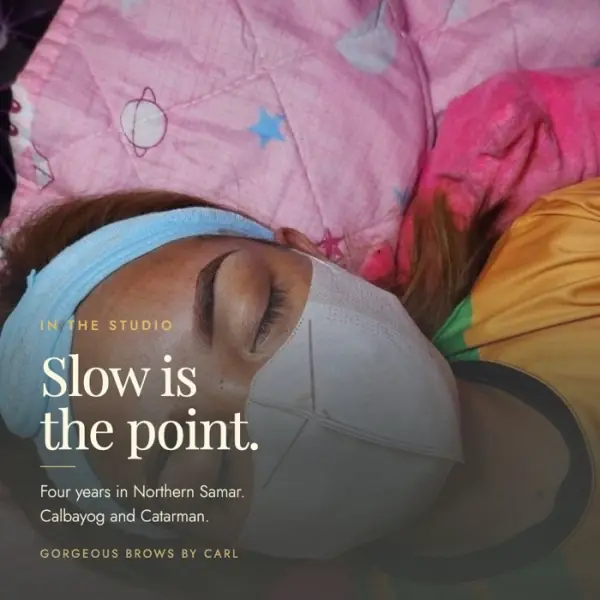
  • Three finishes, one studioI labelled powder, ombre and individual hairs so they compare side by side.
  • Sculpted, then healedI cut it in order: the shape, the mapping, then the finished view.
  • Powder brows, close upI kept it plain: one caption over three close views of one finish.
  • Map to resultI left the studio's own take as shot and added only the brand line.

Static posts, brow studio

  • Static post answering the price question
    PriceNames the number instead of hiding it.
  • Static post about healed results
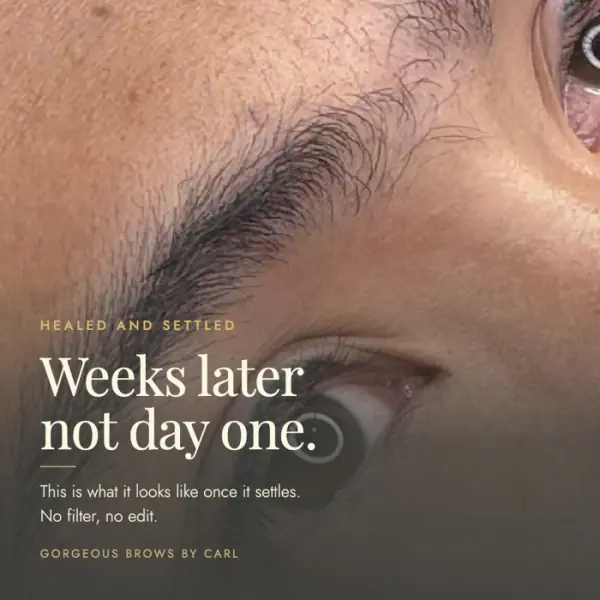
    Healed resultWeeks later, not day one.
  • Static post about brow mapping
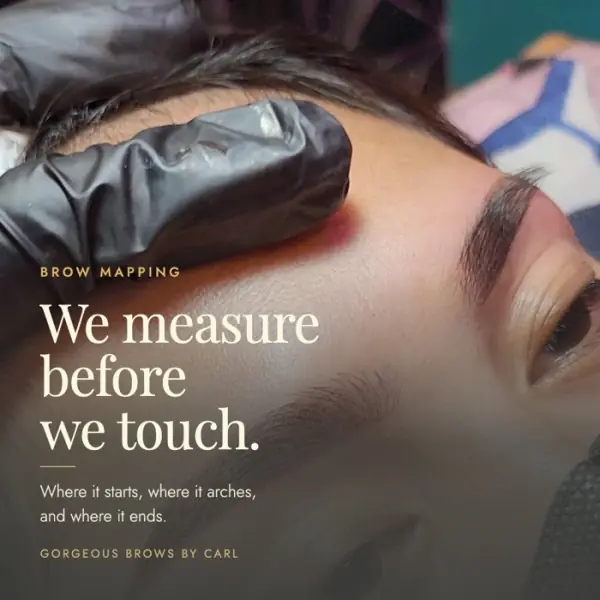
    MappingThe step clients do not know they are paying for.
  • Static post about the pace of the procedure
    PaceSlow is the feature, not the delay.
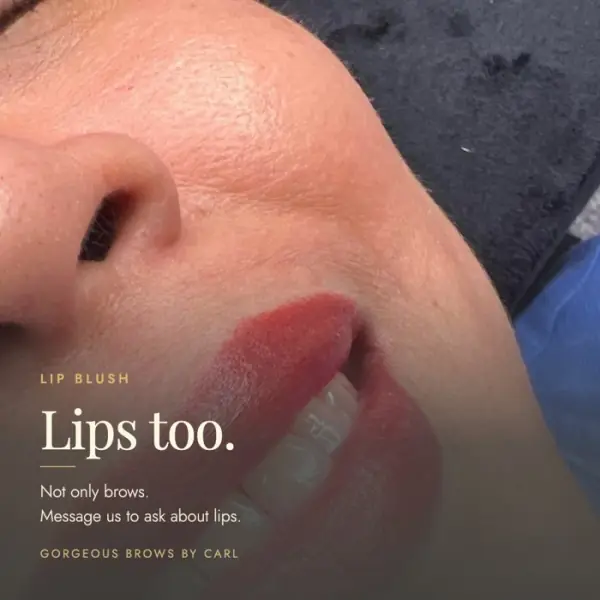
  • Static post about lip blush
    Second serviceIntroduces lips to people who came for brows.
  • Static post using real client results
    Real clientsUnretouched results as the proof.

Real estate videos

  • Union Square, V2Property video edited by me.
  • Amberwood, upbeat cutTested against a calm cut of the same script, to read tempo on its own.
  • The Hillshore, hook v2Discount-led open, one of several hook variants on one script.
  • ELTAThe neighbourhood sells before the unit does.

Property renders and studio photography were supplied by the client or developer, and some property b-roll is AI generated. The angles, scripts, copy and builds are mine. The brow studio posts and videos carry the studio's own branding.

Monthly reporting

What my ad report tells you.

What I did, what I learned, what comes next, and what each number does and does not mean.

Format sample, not a client report.

No client or campaign data is shown here. This is a readable walkthrough of the report structure.

  1. This month at a glance

    Spend, leads or conversations, cost per result and the change from the last period. Each figure is read against the agreed target. If there is no previous period, I say it is the first report.

  2. What I did

    The approved actions I actually carried out, with a reason for each. If nothing changed, I explain why. Planned work is kept separate from completed work.

  3. What I learned

    The findings, what supports them and what they mean for the business. I separate a result from a possible explanation and say when there is not enough data.

  4. What is next

    One main recommendation, the finding behind it, and the decision or material I need from the owner. Live changes wait for approval.

  5. Looking ahead

    What the next period will test and what I will measure. The next report checks whether the plan was followed and what happened. No guaranteed result.

What each number counts
Reading ad results
MeasureWhat it countsWhat it does not tell you
LeadSomeone filled in the ad form.Whether they can buy or will answer the phone.
ConversationSomeone started a chat with the business.Whether they booked.
Cost per leadAd spend divided by leads.What a customer costs. Where lead quality is recorded, I also read cost per qualified lead.
Click rateThe share of people who saw the ad and tapped it.Whether the page, form or follow-up did its job.

A real report uses the live ad-account figures for the named period, the agreed target and the work actually completed. Unavailable figures are marked as unavailable.

Ad testing

A written guess. A result. A lesson.

I log the question before spending, read the result against it, and carry the lesson into the next test. Qualified leads matter more than the cheapest raw lead.

  1. One question, one change

    I write a hypothesis and change one thing. The audience, budget, offer and form stay the same unless one of them is the thing being tested.

  2. A guess before launch

    For each ad I record the customer type, what they already know, the angle, the hook, the proof and what I expect to happen.

  3. A written record

    The test and each ad get their own rows. Dates, budget and the plan are recorded before the spend, so the result can be read against the original question.

  4. Enough data for a fair read

    I check that the budget can support the ads being tested. An ad without enough data stays untested. A small budget answers one question at a time.

  5. Lead quality, then the lesson

    Where the CRM records lead quality, I judge cost per qualified lead. Without that evidence I do not call a winner. A finished test ends with a verdict, a reason and a lesson to read before the next one.

How the record is organised
The four working tabs
TabWhat I record
TestsThe question, one change, what stays constant, budget, dates, decision and lesson links.
AdsThe creative, customer type, awareness, angle, hook, proof, my guess, results and lead-quality verdict.
LessonsWhat I learned, why, how confident I am and where the lesson applies.
Customer typesThe person, situation and objection the ad is written for.
What this gives you

A traceable decision and something to learn from. It does not guarantee a winning ad. The record needs lead-quality evidence before I can judge qualified-lead cost.

Workflow screenshots

G-SYNQ workflow screenshots.

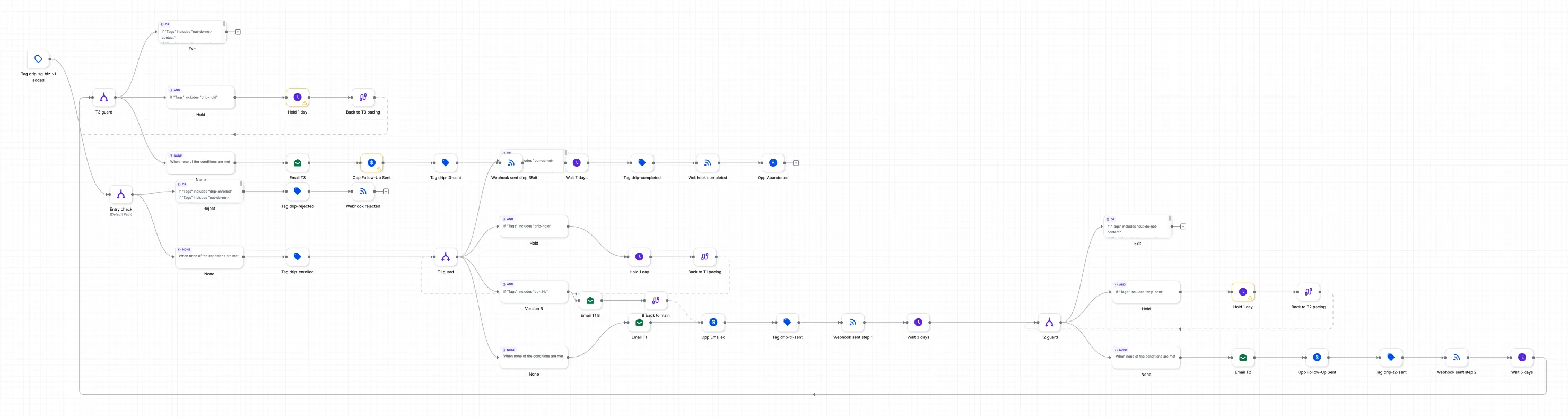
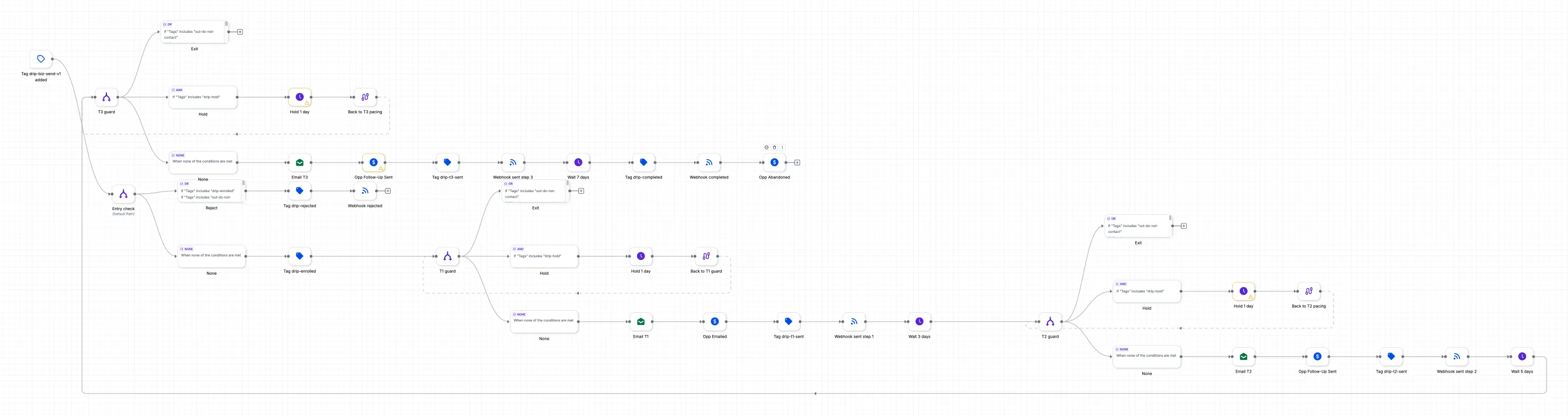
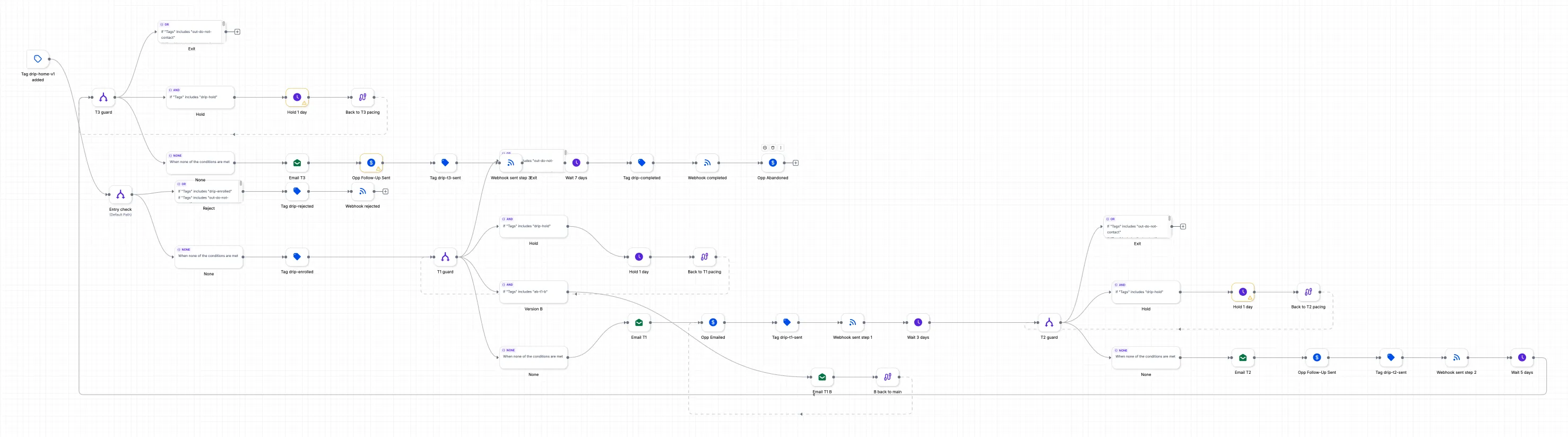
Nine published automations in my own G-SYNQ GoHighLevel account, captured on 4 October 2026. These are my own system, with no lead data shown.

Each square holds two screenshots. Scroll sideways and down inside it to read every step, or click a screenshot to open it full size.

Published workflow · captured 4 Oct 2026

Review request

A form submission stops cold follow-up, opens a deal in my inbound pipeline, sends an acknowledgement and gives me a task to prepare the plan.

The enquiry becomes a task I can act on, with its own deal in the pipeline.

GoHighLevel canvas of the Review request workflow

Published workflow · captured 4 Oct 2026

Reply handler

A reply removes the contact from cold follow-up. Real replies create a notification and task. Opt-out words start the stop workflow; automatic replies skip the alert.

Someone who has replied stops receiving the cold sequence.

GoHighLevel canvas of the Reply handler workflow

Published workflow · captured 4 Oct 2026

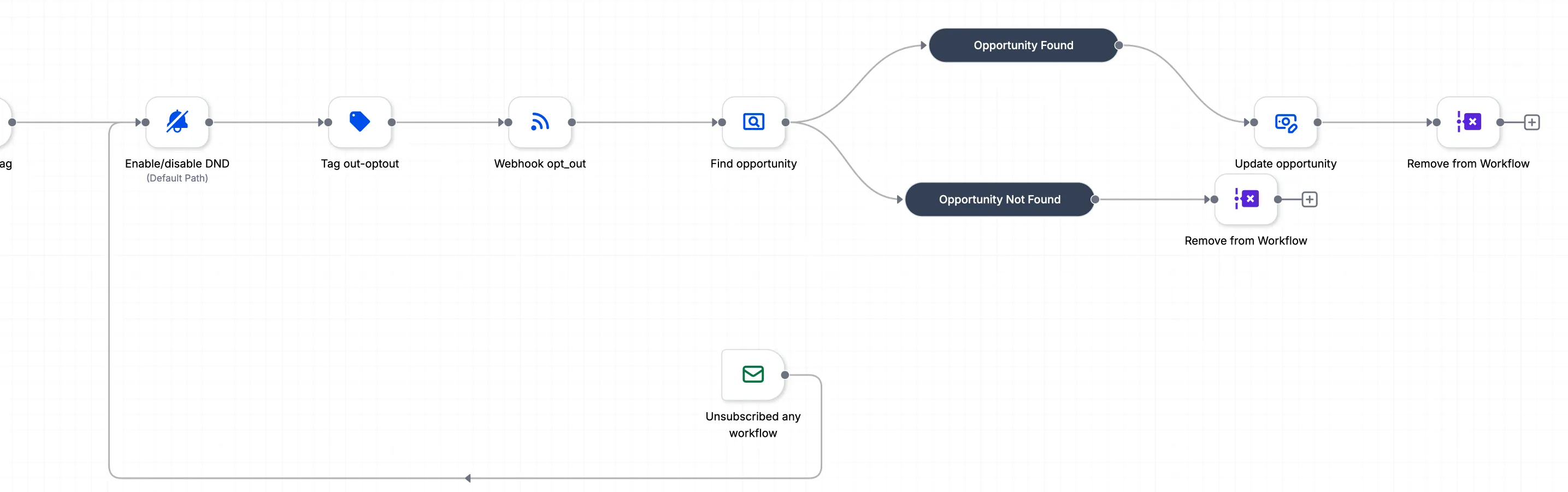
Do not contact

An opt-out switches off messaging, records the stop in my lead database and moves an existing outbound deal to Lost.

One opt-out is recorded across the systems that handle follow-up.

GoHighLevel canvas of the Do not contact workflow

Published workflow · captured 4 Oct 2026

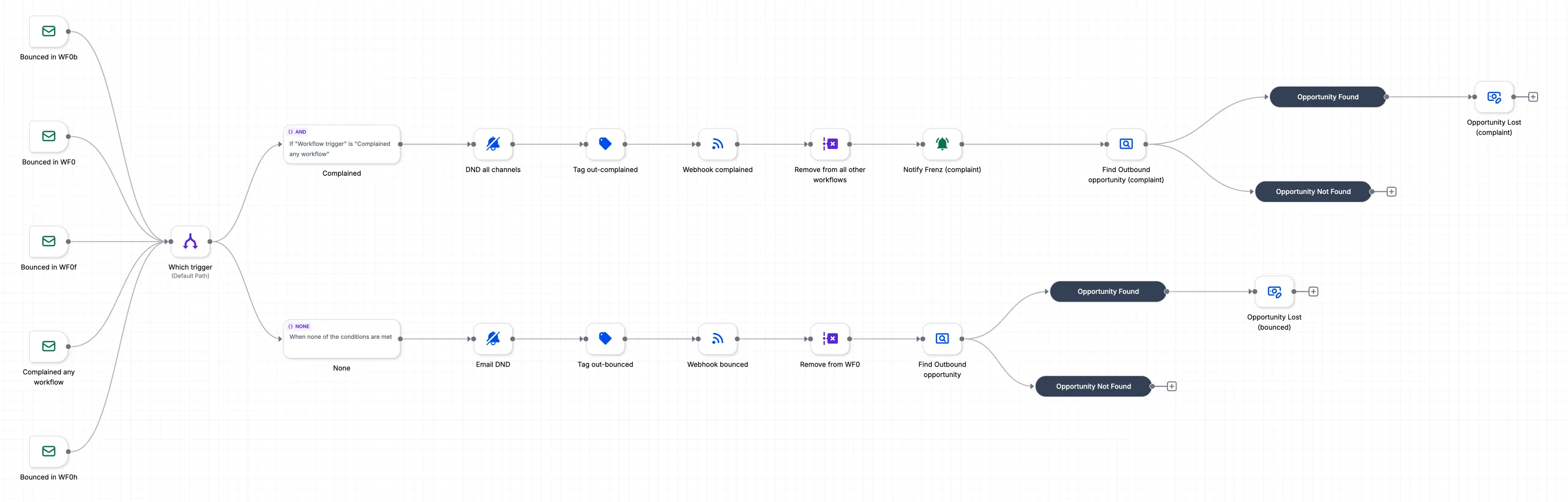
Email events guard

A bounce stops email. A spam complaint stops all channels. Both are recorded in my lead database and close an existing outbound deal.

Bad addresses and complaints stop further follow-up.

GoHighLevel canvas of the Email events guard workflow

Published workflow · captured 4 Oct 2026

Singapore property-agent sequence

Three emails with stop and pause checks before each send. A reply, booking or opt-out prevents the sequence from continuing.

Each send is checked again, even after the contact has enrolled.

GoHighLevel canvas of the Singapore property-agent sequence workflow

Published workflow · captured 4 Oct 2026

Singapore business-owner sequence

A separate three-email sequence for business owners, with the same stop checks and a record of each send in my lead database.

The wording fits the audience while the stop checks remain in place.

GoHighLevel canvas of the Singapore business-owner sequence workflow

Published workflow · captured 4 Oct 2026

Separate sending-domain sequence

A three-email business sequence sent through a separate domain. It rejects existing review requests and checks stop and pause tags before sending.

Cold outreach uses a separate sending domain.

GoHighLevel canvas of the Separate sending-domain sequence workflow

Published workflow · captured 4 Oct 2026

Follow-up-only sequence

For contacts who already received the first email, this sequence sends only the two follow-ups, with stop and pause checks.

The opening email is not sent twice.

GoHighLevel canvas of the Follow-up-only sequence workflow

Published workflow · captured 4 Oct 2026

Home-services sequence

Home-services businesses have their own three-email sequence, with stop and pause checks before each email and send records in my lead database.

The follow-up wording speaks to the trade.

GoHighLevel canvas of the Home-services sequence workflow

Client system · anonymised

How a lead moves through a client's GoHighLevel

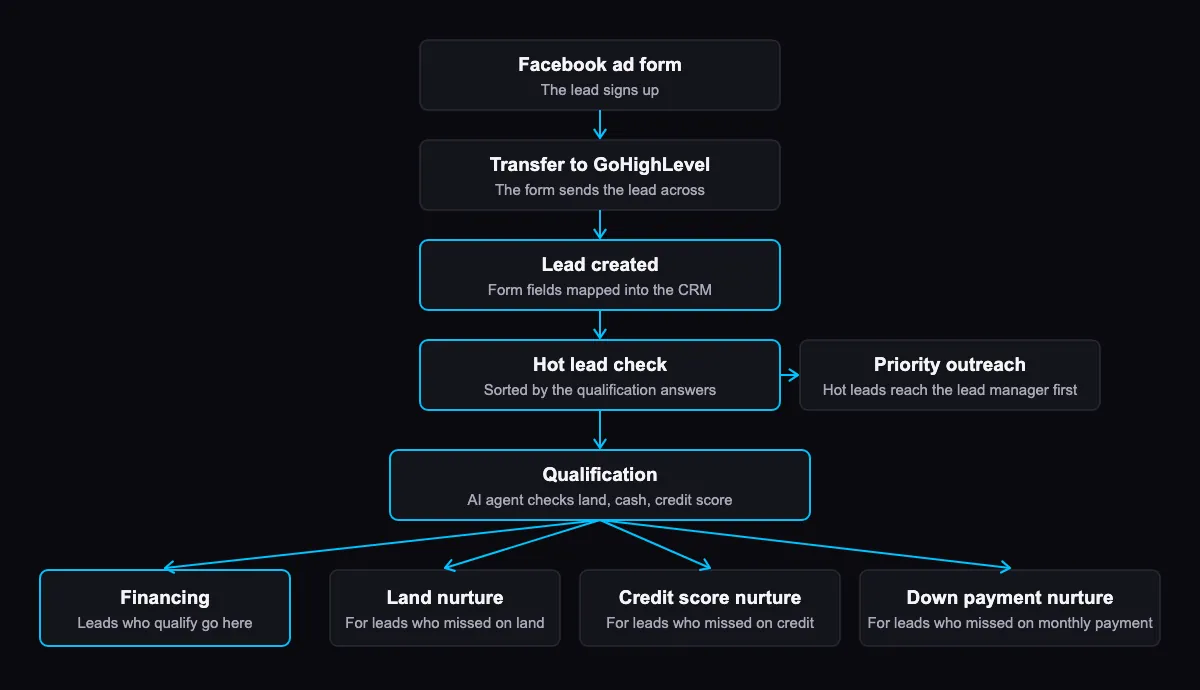
Diagram: a Facebook ad form lead is sent to GoHighLevel, created through field mapping, checked for hot lead status, screened by an AI qualification agent, then sent to financing or to a land, credit score or down payment nurture workflow
Open full-size diagram: client lead flow

A lead signs up on the Facebook ad form and the form sends it to GoHighLevel. Field mapping creates the lead, and the system checks whether it is a hot lead. Hot leads go to the lead manager first. Every lead is screened by an AI qualification agent. Those who qualify go to financing. The others go to the nurture workflow that matches where they fell short: land, credit score or monthly down payment.

Hot leads get a person quickly, and the others are followed up on the point that held them back. The client's name, people and figures are not shown.

Walkthroughs

Client acquisition

Where the click goes. Page and CRM as one system.

I build the page and the CRM behind it, so the ad, the form and the follow-up work as one system. Hover a window to scroll through the whole page, or tap one to open it.

Concept page, sample business

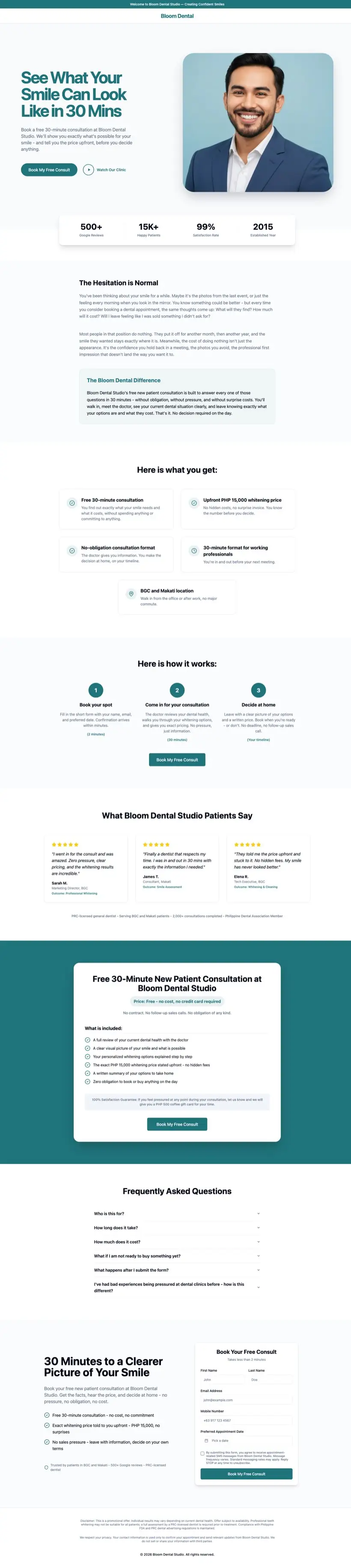
Dental consult page (concept)A concept page for a sample dental clinic, not a client. The business, reviews and figures on it are placeholders. It shows the layout: a free consultation offer with the price named upfront. Open the concept page (new tab)

I also make short animated videos. See my video and motion design work.

My own system

I run G-SYNQ on it too.

Every review request on this website goes through the same kind of system I build for clients: the enquiry is tagged, added to my pipeline, gets an acknowledgement email straight away, and creates a task so it is answered on time.

Your free review is the easiest way to see what it would do for your enquiries.

  1. Form submitted
  2. Tagged as a review request
  3. Opened in my pipeline at New Lead
  4. Notification email to me
  5. Task created for me to prepare your plan
  6. Confirmation email sent to you
  7. Consent recorded
What happens in my own GoHighLevel account when someone sends me a review request. Redrawn from my workflow, no lead data. The confirmation email is automatic. The plan itself I write myself.

How I build it

Six steps. One person accountable.

One person, six steps. Everything has to help an enquiry become a client, or it doesn't go in.

  1. Diagnose

    You tell me how enquiries reach you today, through ads, forms, messages or search. I find where they slip through.

  2. Map

    I plan the route before building anything: the pipeline stages, the forms, the follow-up and the pages that lead into it.

  3. Build

    The ads, the GoHighLevel pipeline and follow-up, and the SEO work, built by me. Your contacts and data stay yours, and you can export them at any time.

  4. Test

    Every message and every link is checked before launch. On the dealer build, checking all sixteen messages caught one broken merge tag.

  5. Launch

    New enquiries start getting answered straight away. Nothing goes live, no ad, page or message, until you have approved it.

  6. Report

    I report what the numbers are, in context: leads are leads, conversations are conversations, and I say what is still waiting.

Reference

A reference. In full.

In practice, Frenz was our lead builder: when we decided to modernize how both businesses run, he was the person who turned those plans into working systems.

His largest contribution was the build-out of our GoHighLevel CRM. Frenz led the hands-on setup for Modera Homes first, then replicated and adapted it for Your Choice Home Buyers, which meant designing pipelines, custom fields, and lead-handling automations for two very different sales processes.

Just as valuable was how he worked. Frenz operated remotely, roughly twelve hours ahead of our team, and still kept projects moving with little hand-holding. He was self-directed, receptive to feedback, and willing to rework something when we changed direction.

Dave CostelloDirector of Operations, Modera Homes and Your Choice Home Buyers
From a letter dated 6 October 2026

In short

In short.

Three sets of ad results, a set of video and static ad creative, and one landing page, all on this page.

  1. 01

    US manufactured-home dealer.

    Form leads at $17.11 each on $3,114 of ad spend, into a CRM I built with nine live follow-up workflows.

  2. 02

    Brow studio, Philippines.

    Messenger conversations at ₱10.40 each on ₱21,083 of spend. These are conversations, not leads or bookings.

  3. 03

    Singapore property agent.

    Form leads at S$12.17 each on S$511 of spend, from a campaign launched on 22 September, with an 8.09% click rate.

  4. 04

    Creative and pages.

    Video ads and static posts for the brow studio and Singapore property campaigns, plus one landing page, a concept for a sample business rather than a client.

03 SEO

SEO work.

The SEO on my own site, with what changed and what moved.

SEO log

Small numbers. A visible record.

I run SEO on my own site and keep a dated log of what I changed, what moved and what is still waiting. The rebuilt site is new, so these figures are early evidence.

Snapshot recorded 4 October 2026

These are the saved measurements for the dates below. They are not live counters or results of the new portfolio sections.

Where the site stood on 4 October 2026
MeasureRecorded resultSource and period
Pages indexed25 of 25 sitemap pagesGoogle URL Inspection, checked 4 Oct 2026. Before the sample-plan page.
Search clicks0Search Console, 6 Sep to 3 Oct 2026.
Search impressions46Search Console, 6 Sep to 3 Oct 2026; 10 before the rebuilt site and 36 since.
Average search position33.9Same Search Console period. Small sample; too early to judge.
Visible queries17Same Search Console period; covering 22 of 46 impressions.
Buyer queryNone yetAssessment in the 4 Oct 2026 log for the same period.
PageSpeed mobile labHome 99 · Work 99One run per page, 4 Oct 2026, before these portfolio additions. Not real-visitor data.
Visits104 visits · 123 page loadsCloudflare Web Analytics, 28 Sep to 1 Oct 2026, pulled 2 Oct. Includes my visits.
What I did, and when
  1. 25 Sep 2026 · Rebuilt site live

    The company site moved from GoHighLevel to Cloudflare Pages. Old page addresses redirect to the new pages.

  2. 28 Sep 2026 · Baseline and technical work

    I recorded the starting figures, submitted the sitemap, cleaned up internal links, connected structured data, and changed fonts, titles and descriptions. Guides and country pages followed.

  3. 29 Sep 2026 · Indexing check

    17 of 20 pages were indexed. I checked for blockers, added links from the home page and menu, and recorded the pages still waiting.

  4. 30 Sep 2026 · SEO service and more guides

    An SEO service page and four more guides brought the guide total to 12. I defined the checks that tell me when there is enough content for now.

  5. 1 Oct 2026 · Redesign

    Home, Work and Book were redesigned. Changes to indexed pages need time before I can judge a movement.

  6. 2 Oct 2026 · Tracking

    I built a private tracker for pages, queries, changes and visits. All 25 pages were indexed.

  7. 4 Oct 2026 · Recheck

    The figures above come from the saved 4 October check. This log preserves the measurement dates.

How I check progress
  1. Map the query to a page

    Each target phrase has an intent and a page. I approve the keyword map before making changes.

  2. Write the change plan

    I record the evidence, the change, what I expect to move, how to undo it and how to check it.

  3. Check a signal before reacting

    I verify a reported issue against Google’s own data before treating it as a fault.

  4. Read several time windows

    I compare 7, 14 and 30 days. A changed page stays too early to judge until it has enough data.

  5. Keep the record

    Changes, checks and lessons are dated so the next decision starts with what I already learned.

Still waiting, in the 4 October log

No attributable search enquiries yet. Outside profiles were not completed in the recorded check. Wider AI-search testing remains untested; one earlier Bing check is not a citation rate.

Next checkpoint in the plan: . Recheck indexing, Search Console and visits, then add a dated update.

→ Free, no obligation

Enquiries slipping through? Let's fix the follow-up.

Answer four quick questions about how enquiries reach you today. You'll get a one-page plan showing where enquiries are likely slipping through and what an automated follow-up would do about it. No call required.

Prefer to talk first? Book 30 minutes.

Or message me on Messenger or WhatsApp

Requests received by 3pm Singapore time get their plan the same business day; later requests, the next business day.

Get my free review